skip to main |
skip to sidebar
Latest Entries »
Showing posts with label
Backup and Restore of Company Data.
Show all posts
Showing posts with label
Backup and Restore of Company Data.
Show all posts
If the data stored in your hard disk get damaged or deleted for reasons below your control. In such a sitution you can get back the data by copying back the data kept at another place through Back Up process. This process of getting back the data is known as Restoration of Data.
Restoration is possible only if you have taken back up earlier. If there is no back up, restoration is not possible. Back up is quiet an important task for all companies.
Restoration can be done in the following process:
Press Alt + F3 at Gateway of Tally to open the Company Info menu. Then there select the option Restore. It will take you to the 'Select Companies to Restore' screen.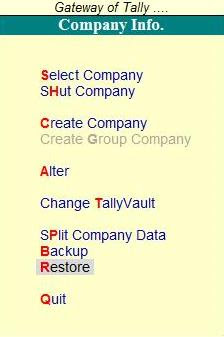 You will notice there that the last used Source and Destination path is displayed here.
The source field should have the full directory name from where you want to bring back the previous data. As you enter the full directory name, it will read the contents of the particular file and will then display the list of companies available.
In the Destination field mention the location on the hard disk where the company data needs to be copied back.
The companies available at the specified directory at the source field are found in the list. It means that the backup of these companies are available at the location mentioned in the Source field. There you have to select the companies you want to be restored. Then press 'y' to start restoration.
When we work in Tally the company data is stored in Hard Disk but for safety a copy of data should always be kept in another media like CD, Floppy, etc. The data can also be kept in Hard Disk. The process of keeping another copy of the data in another place is known as Back Up.
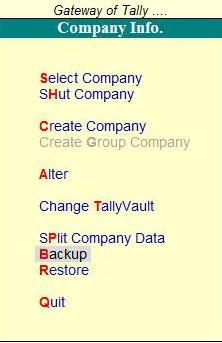
Go to Company Info menu from Gateway of Tally by pressing Alt + F3, select the option 'Backup' there. Then it will take you to "Select Companies to Backup" screen.
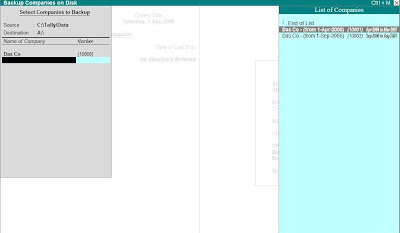 There you have to enter the following details:
- Source : It is generally taken by default. Here the user needs to enter the full directory name where the company data is stored.
- Destiation : Here the user has to enter the full directory name where the backup data is to be stored.
- Name of Company : Here the user has to select the names of the company from the given list whose data is to be copied. More than one company can be selected and once the user is done with the selection, the user needs to select End of List and click on 'Yes' at Accept? to start the backup process.
- Multi Volume Backup : When there is huge volume of data and one media is insufficient to store the complete data then Tally will prompt the user to insert second disk.
Remember that you have to mark the disks serially to maintain the sequence while restoring the backup data.


