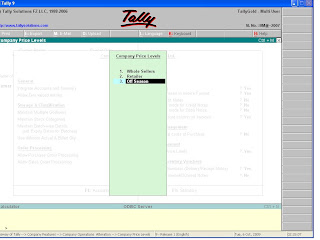
At the party/debtors ledger or alteration screen the appropriate price list at the 'Price Level Applicable?' field, which will be applicable for the selected party.
Latest Entries »
Showing posts with label Price List and Price Level. Show all posts
Oct 6, 2009
Price List and Price Level
Some organizations may use different prices for different customers. In Tally, you may create different price lists and enter the price and discount rates of each item for the related period. During invoice entry, select the appropriate price list to carry the rate in the sales invoice. You don't have to give the rates of discount, they will take it automatically as you select the price list.
In order to enter the rates first press F11 and then F2. Set 'Separate Discount Column' and 'Multiple Price Level' as 'yes', there you have to enter the names of different price levels. For example whole-sellers, retailers, of season etc. Then press enter if you have written all the names.

Then go to Inventory Info from Gateway of Tally and select price list there and press enter. Enter the following information there and save it.
Then apply it in vouchers entries.
In order to enter the rates first press F11 and then F2. Set 'Separate Discount Column' and 'Multiple Price Level' as 'yes', there you have to enter the names of different price levels. For example whole-sellers, retailers, of season etc. Then press enter if you have written all the names.
Then go to Inventory Info from Gateway of Tally and select price list there and press enter. Enter the following information there and save it.
Then apply it in vouchers entries.
Labels:
Price List and Price Level
Subscribe to:
Comments (Atom)
Basics about Tally
Copying masters from one company to another
Cost Category and Cost Centre
Download ODBC software
Download PayCheck 2.0 software
Download Tally 7.2
Download Tally 7.2 to Tally 9 Migration Utility
Download Tally 9
Excise Duty
Export and import data from one company to another
Exporting of Data from Tally
Fringe Benefit Tax(FBT)
Group Company
Importing Data to Tally
Interest Calculation
Multi Columnar Reports
Multiple comapny activation
Scenario
Security Levels
Security of data
Service Tax
Split Financial Year
Tax Collected at Source(TCS)
Tax Deducted at Source(TDS)
Value Added Tax(VAT)
Voucher Entries
Web enabled features of Tally