
The deductor has to give a certificate to the deductee, as proof of deduction of TDS from the party. This certificate is given in different forms which varies with the type of payment.
In order to Print Form 16A, go to Gateway of tally -> Display -> Statutory Reports -> TDS Reports -> Print Form 16A. Select the TDS party ledger from the list, specify the details to get Form 16A printout.
Latest Entries »
Showing posts with label Tax Deducted at Source(TDS). Show all posts
Showing posts with label Tax Deducted at Source(TDS). Show all posts
Oct 24, 2009
TDS Reports
In order to view the TDS report go to Gateway of Tally -> Display -> Statement of Accounts -> TDS outstanding. The various reports can be viewed through the options available at TDS Outstanding menu.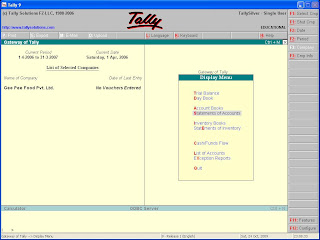

Challan Reconciliation
You can use the details of the TDS challan and information previously saved, for future reconciliation purpose. After printing the deposit challan, the details are entered through the Challan Reconciliation button(F5). Bank challan Number, Challan Date, Bank Branch Code, Cheque Number are the detailed entry made. Accept and save it.
Oct 23, 2009
TDS Challan Printing
To print the TDS challan, after saving the Payment voucher, click on the print button. Printing dialogue box is activated. Then fill up general printing specification and select 'yes' to print as TDS challan option.
TDS Deposit to Government
TDS so collected from payments is required to be deposited to the bank. Then challan is required to be created. It can be created using TDS Helper button in Payment voucher mode. It will lead you to TDS filters. Fill up the criteria. Then fill up the following :
TDS ledger : Give the particular expense account.
Deductee status : Give here the information that the company is a company or non-company.
After entering the details select the bank account and then accept payment voucher screen and save the entry.
TDS ledger : Give the particular expense account.
Deductee status : Give here the information that the company is a company or non-company.
After entering the details select the bank account and then accept payment voucher screen and save the entry.
After Deducting TDS, Payment to Party
After the journal entry, the payment entry to the party is to be made. Open the payment voucher(Gateway of Tally -> Accounting Vouchers -> F5) and select the party ledger, to get the screen for bill allocation. Bills which are yet to be paid are shown here after deduction of TDS. Select the bills to be paid.
Expense Booking
You can make payment after deduction of TDS and book the expenses at the same time, using Journal Voucher(F7).
Go to Journal Voucher screen(Gateway of Tally -> Accounting Vouchers -> F7), select the expense ledger in the particulars column and enter the amount in the Debit column. Then select the name of the party, from whom TDS is to be deducted. Press enter. You will be able to view Bill-wise Details.
In Bill-wise Details screen, select the New Ref under Method of Adj., enter other details, then select the TDS ledger from the list, the rate will be displayed automatically. Press 'Y' to accept the voucher.
Go to Journal Voucher screen(Gateway of Tally -> Accounting Vouchers -> F7), select the expense ledger in the particulars column and enter the amount in the Debit column. Then select the name of the party, from whom TDS is to be deducted. Press enter. You will be able to view Bill-wise Details.
In Bill-wise Details screen, select the New Ref under Method of Adj., enter other details, then select the TDS ledger from the list, the rate will be displayed automatically. Press 'Y' to accept the voucher.
Oct 22, 2009
Configuration Set up for TDS
In order to set up configuration for TDS in Vouchers so that TDS rates may be altered. Press F12 and then select Voucher entry and press enter. Set the option "Allow Alteration of TDS Rates" as 'yes'. This will help you in making changes in TDS rates.
Creating Ledger Account of Party/Deductee
Go to Ledger Creation(Gateway of Tally -> Accounts Info. -> Ledger -> Create). At ledger creation or alteration screen the party/deductee from whom TDS is to be deducted. The following information is to be provided :
Is TDS applicable : Set 'yes' this option.
Is Lower/No Deduction Applicable : If lower deduction is not applicable then set this option to 'no'.
Ignore surcharge : In certain cases, when the limit for TDS is reached, surcharge on TDS is levied. If this option is set as 'yes', surcharge will be deducted without any consideration to the exemption limit. If this option is set as 'no', surcharge will be calculated, only when the exemption limit is crossed.
Is TDS applicable : Set 'yes' this option.
Is Lower/No Deduction Applicable : If lower deduction is not applicable then set this option to 'no'.
Ignore surcharge : In certain cases, when the limit for TDS is reached, surcharge on TDS is levied. If this option is set as 'yes', surcharge will be deducted without any consideration to the exemption limit. If this option is set as 'no', surcharge will be calculated, only when the exemption limit is crossed.
Creation of TDS Ledger Accounts
First go to Ledger Creation screen(Gateway of Tally -> Accounts Info. -> Ledger -> Create), and enter the following details:
Name : Enter the name of the ledger account to be created i.e. TDS Account.
Under : Ledger should be created under Duties and Taxes.
Type of Duty/Tax : Select TDS from the list given.
Nature of Payment : Select the nature from the given list.
Ignore TDS exemption limit : For certain payments there is a limit, crossing which, TDS will be deducted. If you set the option as 'yes', TDS will be deducted only when the amount of payment exceeds that limit.
Name : Enter the name of the ledger account to be created i.e. TDS Account.
Under : Ledger should be created under Duties and Taxes.
Type of Duty/Tax : Select TDS from the list given.
Nature of Payment : Select the nature from the given list.
Ignore TDS exemption limit : For certain payments there is a limit, crossing which, TDS will be deducted. If you set the option as 'yes', TDS will be deducted only when the amount of payment exceeds that limit.
Oct 21, 2009
Company TDS Deductor Details
The following information has to be entered:
- Tax Assessment Number : Enter 10 digit TAN number of the company.
- Income Tax Circle/Ward(TDS) : Enter the Income Tax Circle/Ward number under which the Company is assessed.
- Deductor Type : Two options are there Government and other. Select the right option.
- Name of the person responsible : Here name of the company official responsible for deposit of TDS is to be given.
- Designation : Give the designation of the person whose name has been displayed in 'Name of the person responsible'.
Activating TDS in Tally
In order to activate TDS in Tally, press F11 from Gateway of Tally. Then press F3 or select Statutory & Taxation option. At the screen two options available - "Enable Tax Deducted at Source(TDS)" and "Set/Alter TDS Details". Set these options as 'yes'.
Oct 19, 2009
Tax Deduction at Source(TDS)
TDS is one of the method of collecting Income-Tax under certain circumstances from the assessee. If any specified type of income arises to any person, the Income-Tax Act requires the payer(deductor) of such income to deduct a stipulated percentage of such income at the time of making payment. Only the balance amount is paid to the receiver. The amount deducted as TDS has to be deposited into the Government Treasury, within a specified time.
The TDS is treated as Income Tax payment by the receiver at the time of assessment. A TDS certificate is to be given to the receiver.
Some of the incomes are - salary, interest, dividend, interest on securities, commission and brokerage ,etc
The TDS is treated as Income Tax payment by the receiver at the time of assessment. A TDS certificate is to be given to the receiver.
Some of the incomes are - salary, interest, dividend, interest on securities, commission and brokerage ,etc
Subscribe to:
Comments (Atom)

Important Links and searches


