

Latest Entries »
Nov 20, 2009
Excise Duty-Configuration Set Up
For Excise Duty configuration set up press F12 at Gateway of Tally. Set the options "Use Excise Format" and "Accept Supplementary Details" to 'Yes'.
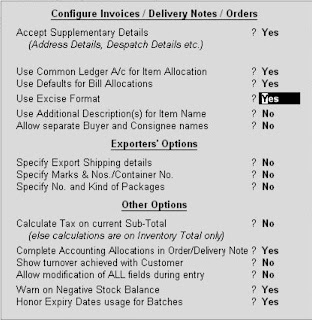
Excise Duty
Another type of Indirect Tax is Excise Duty. It is charged on the manufacture of specified excisable goods at the time, when the goods leave the factory for sale. For Excise Duty, the taxable event is manufacture of goods. Under the Rules of Central Excise, organisations have to submit Excise Invoice under the Central Excise.
Nov 18, 2009
ST-3 Report
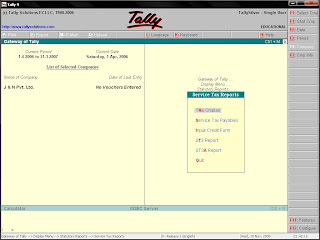
Return for Service Tax is supposed to be filed in Form ST-3 with the Service Tax Department . To print the return in Form ST3, select the option under Service Tax Reports menu. There you will get the Service Tax Return containing details with regard to the value of taxable service charged, value of taxable service realized, Service Tax paid and due. To get a print of this form, from Gateway of Tally, select Display then Statutory Report, select Service Tax Reports then ST3 Report.
Input Credit Form
If an organisation has the opportunity to adjust input credit of service tax paid on purchase of service, Tally will automatically generate input credit of service tax based on the transaction recorded by the user, a report called Input Credit Form. The report will display detailed information regarding the amount of input credit, that may be availed against payment of Service tax. The Input Credit Form should be printed after payment of the purcahse service bill. To get this report go to Display from Gateway of Tally, then select Statutory reports, from there select Service Tax Reports, there you can find the Input Credit Form.
TR-6 Challan for Submitting Service Tax
In order to submit Service Tax to the Government, TR-6 challan is required.To get this challan you have to go to Display menu from Gateway of Tally then go to statutory reports and then select Service Tax Reports, there you will get Tr-6 challan. You can get the print configuration screen of TR-6 challan. To print TR-6 challan set the options there as per your requirement and Press 'y' at the "Print?" screen.

Nov 13, 2009
Service Tax Report
Various reports are generated by Tally which can be viewed in a very easy manner. For viewing the reports from Gateway of Tally -> Display -> Statutory reports -> Service Tax reports.
Subscribe to:
Posts (Atom)

Important Links and searches


