skip to main |
skip to sidebar
Latest Entries »
To download Tally 7.2 to Tally 9 Migration Utility for free.
CLICK HERE>>>
To download Tally 7.2 free
CLICK HERE>>>
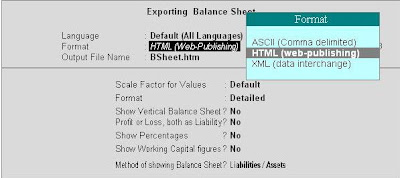
In order to export report data open Tally, go to masters then select the report you want to get, that is balance sheet or profit and loss account etc. and then there you can either click on the Export Button or press Alt + E. It will take you to the export screen where you have to press Esc if you want to edit the default settings. There you have to enter the following details :
Format : Here you have to select the format of the data from the given list in which you want the report to be exported.
HTML Format resolution : If you select HTML in the above option then select a appropriate resolution for display of the report.
Output File name : In this option you have to enter the path of the file name where you want the data to be exported or stored.
Report Data : It is a processed data from Masters and Vouchers of Tally. It helps in transferring the data of the vouchers that is Purchase voucher, sales voucher etc. and data from masters that is data of balance sheet, profit and loss account etc. It helps in transferring reports in electronic form.
Raw Data : It refers to the basic data from Masters and vouchers. Unlike Report Data it can be imported to Tally.
Export of Data : It means transferring of data of Tally from one machine to another or from Tally software to other application software. The uses of Export of data in Tally ar as under:
- Transferring the data to the companies Head Office or other branch.
- To get reports in Spreadsheet format.
- Tally helps in transferring the data to other application software in standard forms like SDF, XML etc. as Tally cannot be used in other software.
The formats used to transfer data in Tally are
- SDF
- ASCII
- HTML
- XML


